
Each component has three different compositions of build tasks that makes a total of three build pipelines:
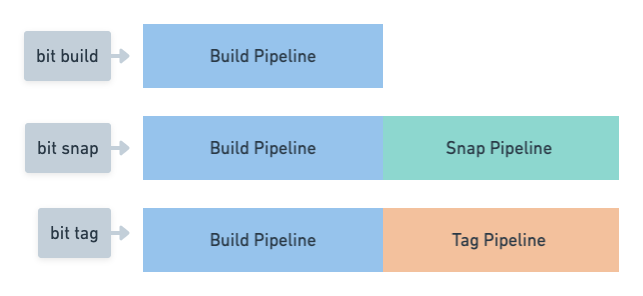
To get a list of the build tasks included in each pipeline for a specific component, run bit build --list-tasks <id>.
For example:
bit build --list-tasks ui/button

Tasks List id: my-scope/ui/button@1.0.0 envId: my-scope/custom-env@0.0.1 Build Pipeline Tasks: teambit.harmony/aspect:CoreExporter teambit.compilation/compiler:TSCompiler teambit.defender/tester:TestComponents teambit.pkg/pkg:PreparePackages teambit.pkg/pkg:PublishDryRun teambit.preview/preview:GeneratePreview Tag Pipeline Tasks: teambit.harmony/application:build_ui_application teambit.pkg/pkg:PackComponents teambit.pkg/pkg:PublishComponents Snap Pipeline Tasks: teambit.pkg/pkg:PackComponents
Components can be built without committing changes using the bit build command. This is often used to test the build process.
bit build runs only the build's build pipeline which mainly includes:
- Generating the component's package
- Installing or symlinking the component's dependencies
- Compiling the component's code (optional)
- Testing the component (optional)
- Generating the component's visualization (mainly, docs and 'compositions')
bit snap executes the basic pipeline, then it adds an additional steps for creating an immutable snapshot for the component.
bit snap executes the basic pipeline, then it adds an additional steps for creating an immutable snapshot for the component. After the snapshot is created, a semantic version is created for that snapshot.
tag will also run the publish task for the components.
