
For a component to be composable and independent, it must maintain its own dependency graph. This graph can include packages, as well as other components.
To add a dependency to a component, include a standard import/require statement in any of its files. Bit will automatically detect these statements and include them in the component's dependency graph.
For example, the following adds the teambit.design/inputs/input-text component as a dependency of (the previously-created) my-org.tasks-scope/apps/to-do component:
import { InputText } from '@teambit/design.inputs.input-text';
Notice how this dependency is consumed as a standard package, even though it is a component. This would be true even if that dependency was maintained in the same workspace. Bit makes this possible by generating a package for each component, during its development and during its build.
Consuming components via their (absolute) package name, makes them usable in any context, whether is is a different workspace or even a non-Bit project.
Run following to install the the above dependency:

Installing components in non-Bit projects
You can install components using standard package managers like npm and Yarn, in Bit and non-Bit projects. To learn more, see Installing components.
Run the following to review the component's data:
The output lists the above dependency as a direct dependency of my-org.tasks-scope/apps/to-do:
│ id │ my-org.tasks-scope/apps/to-do │
├───────────────────┼───────────────────────────────────────────────────────────┤
│ dependencies │ @teambit/design.inputs.input-text@0.0.2- (component) │
│ │ core-js@^3.0.0-------------------------- (package) │
├───────────────────┼───────────────────────────────────────────────────────────┤
│ dev dependencies │ @types/testing-library__jest-dom@5.9.5- (package) │
│ │ @babel/runtime@7.12.18----------------- (package) │
│ │ @types/jest@^26.0.0-------------------- (package) │
│ │ @types/react-dom@^17.0.5--------------- (package) │
│ │ @types/react@^17.0.8------------------- (package) │
│ │ @types/node@12.20.4-------------------- (package) │
├───────────────────┼───────────────────────────────────────────────────────────┤
│ peer dependencies │ @testing-library/react@^12.1.5- (package) │
│ │ react-dom@^16.8.0 || ^17.0.0--- (package) │
│ │ react@^16.8.0 || ^17.0.0------- (package) │
└───────────────────┴───────────────────────────────────────────────────────────┘
Bit maintains a dependency graph of all components in the workspace. This graph is used, among other things, to propagate changes from components to their dependents.
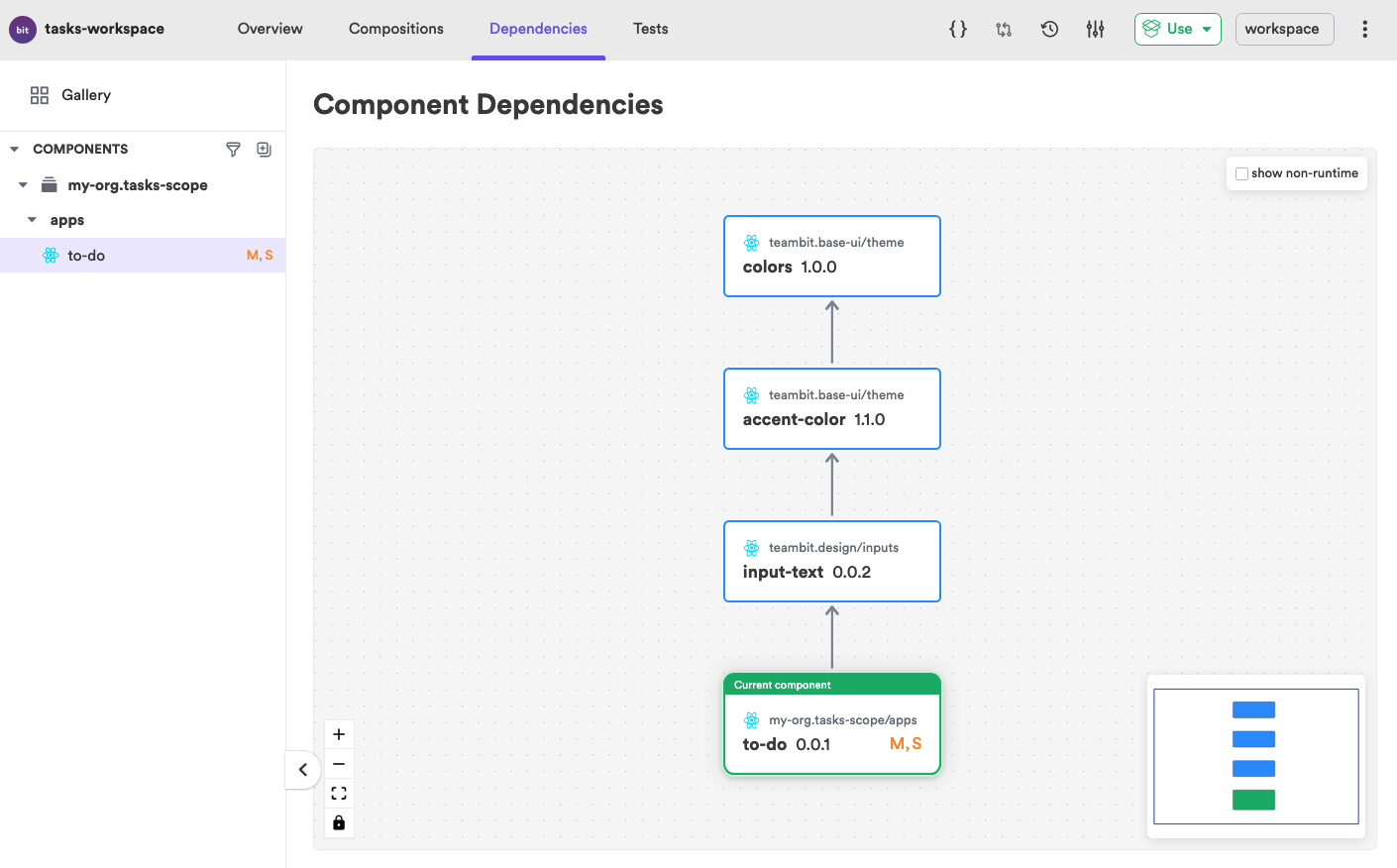
To review the full dependency graph of a component, including its indirect dependencies, head over to the component's 'Dependencies' tab in the UI. Notice how this component has 2 additional indirect dependencies.
The previously installed dependency is now registered in the workspace dependency policy (see it in the workspace.jsonc file below).
The dependency policy defines the external dependencies that are to be installed in that workspace. Note that a workspace policy does not automatically add a dependency to a component. If a dependency is not used by a component, it is not included in its dependency graph.
The version and type of a dependency are determined by Bit after considering multiple sources (listed here by order of importance): component dependency config (defined manually), dependencies defined via aspects (programmatically), dependencies defined via envs (programmatically), and lastly, the workspace dependency policy and Bit's automatic dependency detection.


The previously installed dependency was resolved by Bit as a standard dependency since there are no configurations or policies that define it differently. In addition to standard dependencies, Bit supports dev dependencies and peer dependencies.
Dev dependencies
Dev dependencies can be packages or other components. A dependency is defined as a 'dev dependency' if it's configured as such (manually or programmatically), or if the dependency is only used by the component's dev files (e.g, test files, documentation files, etc.).
Peer dependencies
Peer dependencies can be packages or other components. These are dependencies that are expected to be included in a component's host application. Since peer dependencies play a special "public role" in an app, such as the medium of communication between modules or the app's global state, they are required to exist in just a single instance, a single version.
The peer dependencies of a component are usually configured by its env or by the workspace dependency policy. Note that while components are configured with lenient peer dependency versions (to make them compatible with a wide range of hosts), the host itself (an env or an app) use a concrete version.
